Become cybersafe and learn how to keep your Kandua account safe


Stay safe online
- Cybercrimes such as fraud, phishing and scams are an everyday reality and it’s important to stay informed and be alert to prevent yourself from becoming a victim. We’ve put together a useful guide to help you stay safe online.
Cyber criminals are sending all sorts of scams online.Malicious websites and phishing attacks are now also benefitting from people working from home, many of whom face dire financial situations. Scammers are setting up fake charities, advertising fake products, spreading fake news and luring us with low interest loans or high return investments.
The objectives of these attempts are to steal your money and/or access your personal information.
Phishing
When is a message FAKE?
- Phishing is when you are contacted out of the blue (without you requesting it) and are requested to provide personal information, participate in some activity, open an attachment or simply just click on a link.
This can happen on e-mail, WhatsApp, SMS, Facebook, LinkedIn or even over a phone call. The golden rule is to always think before you respond and never provide personal information including user IDs and passwords.
How to spot a fake or phishing e-mail
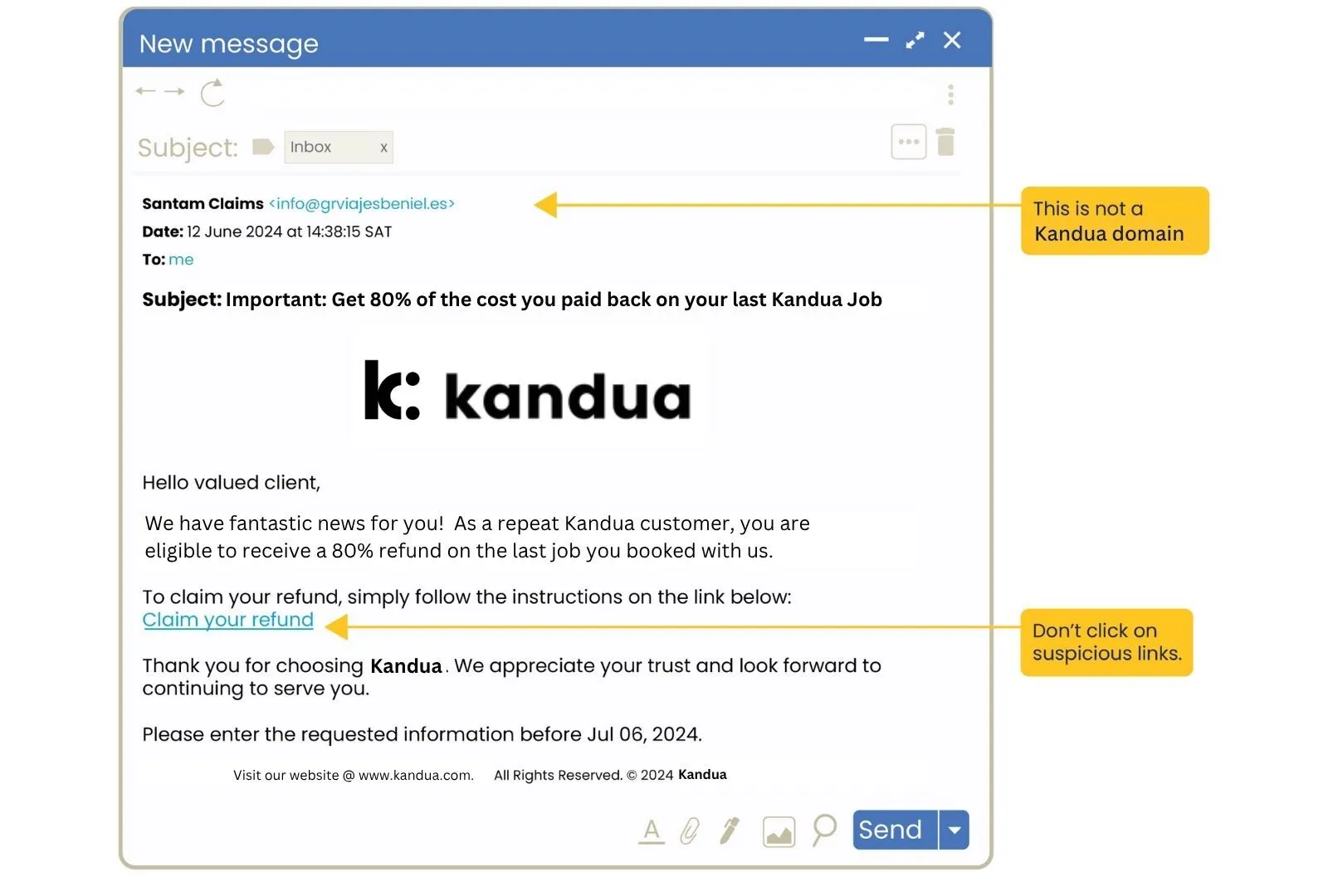
Clicking on an unsafe link is all it takes for criminals to hack into and takeover your machine or online accounts. Did you know that many phishing attacks are so successful because they trigger our emotions and thereby suppress our criing? Just 10 seconds of mindful pausing will reactivate your logical thinking brain – so slow down before reacting to any messages you did not expect and think before you click. Below is a FAKE email. Here are a few fake dimensions techniques:
Example of a fake email
- The information highlighted with the yellow flags indicates that it is fake.

How to spot an unsafe link
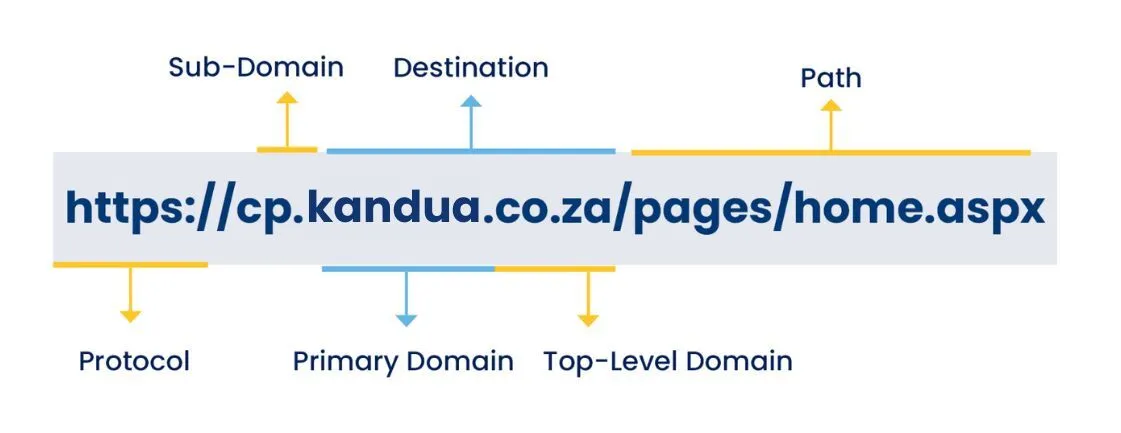
Knowing the difference between a safe and unsafe link can help you stay safe online. Don’t trust any links or attachments in e-mails or social media messages you were not expecting. Always hover over links in e-mails to see the actual link. If you understand the anatomy of a URL, you will be able to see the primary domain, which is the most important part of a URL as it tells you where the link will take you if you click on it.
Example of an unsafe link email
- The information highlighted with the yellow flags indicates that it is an unsafe link email.
Anatomy of a URL
- For example, in the Santam Secure Services URL: https://cp.santam.co.za, the destination is santam.co.za. In the URL: https://google.google-fake.com, the destination is google-fake.com or in the URL: https://verify.microsft.really.com/microsoft.com the destination is really.com and NOT microsoft.com.
To identify the destination that a URL is going to take you to, look at the part AFTER the https://. Now start before the first slash “/”, or if there is no slash start at the end of the URL and look at the parts before that point. The destination is the TWO last parts if the top level domain is .com or the THREE last parts if the top level domain is .co.za.
The diagram shows you that the destination is the primary domain and the top-level domain together.
Protect your passwords
Cybercriminals love passwords! Protect yourself and the organisation with these best practices: